Campaign Criteria Defaults Window
The Campaign Criteria Defaults window is used to customize the display settings for the Campaign Criteria panel. When the Sales Campaign screen is accessed, the Campaign Criteria panel displays based on the settings defined on this window.

|
To access the Campaign Criteria Defaults window, click the |
 (Configure) icon in the Campaign Criteria panel.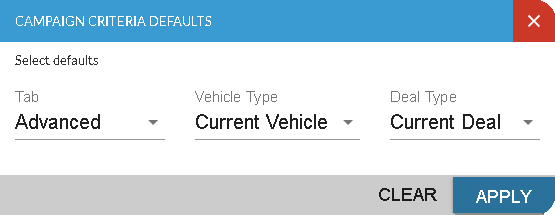
Once settings on this window have been defined, click the APPLY button to save the settings. To clear all changes made since you last saved the information on this window, click the CLEAR button.
The following fields are available on the Campaign Criteria Defaults window.
Tab: Select the tab that should display automatically in the Campaign Criteria panel when the Sales Campaign screen is accessed. Click the  (Down Arrow) icon to display a list of valid entries.
Vehicle Type: Select the type of vehicle tab, such as current or proposed, that should display automatically in the Vehicle Information section of the Campaign Criteria panel when the Sales Campaign screen is accessed. Click the (Down Arrow) icon to display a list of valid entries.
Deal Type: Select the type of deal tab, such as current or proposed, that should display automatically in the Deal Information section of the Campaign Criteria panel when the Sales Campaign screen is accessed. Click the (Down Arrow) icon to display a list of valid entries.
Click here for a list of products that may be mentioned in this help file.